The basics
What is an AI agent? How it works, with an office example
Plain answers for Australian offices: what an AI agent does, the five parts to check, and how to trial one safely on a single task.
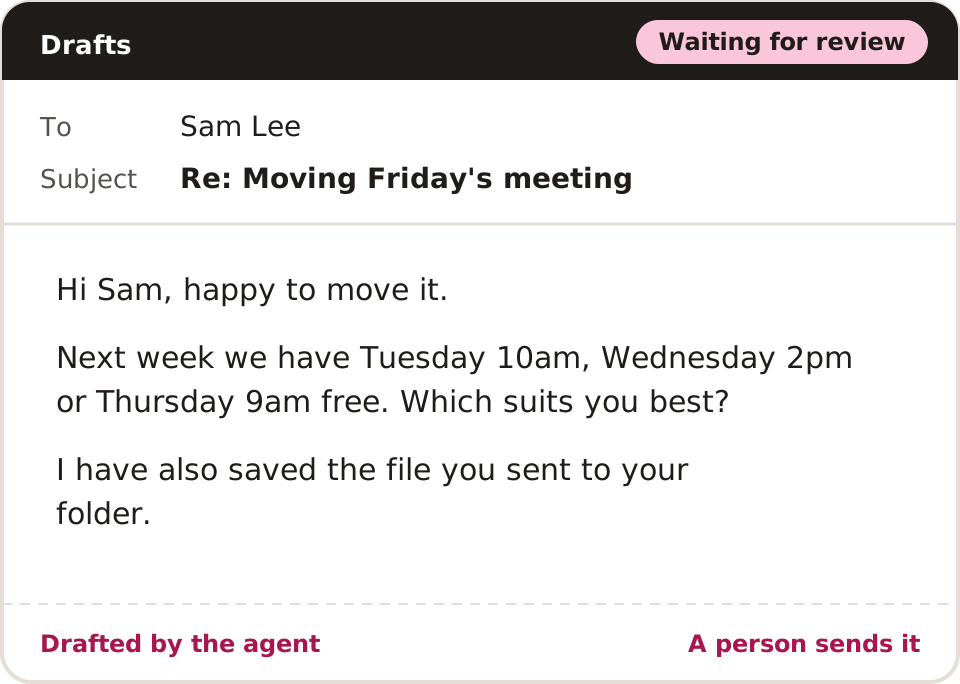
An AI agent is software that uses an AI model to choose actions towards a goal. You give it an outcome, such as one reply to a routine enquiry. It reads the facts it needs, uses the tools it is allowed, checks the result and picks its next step.
How does an AI agent work?
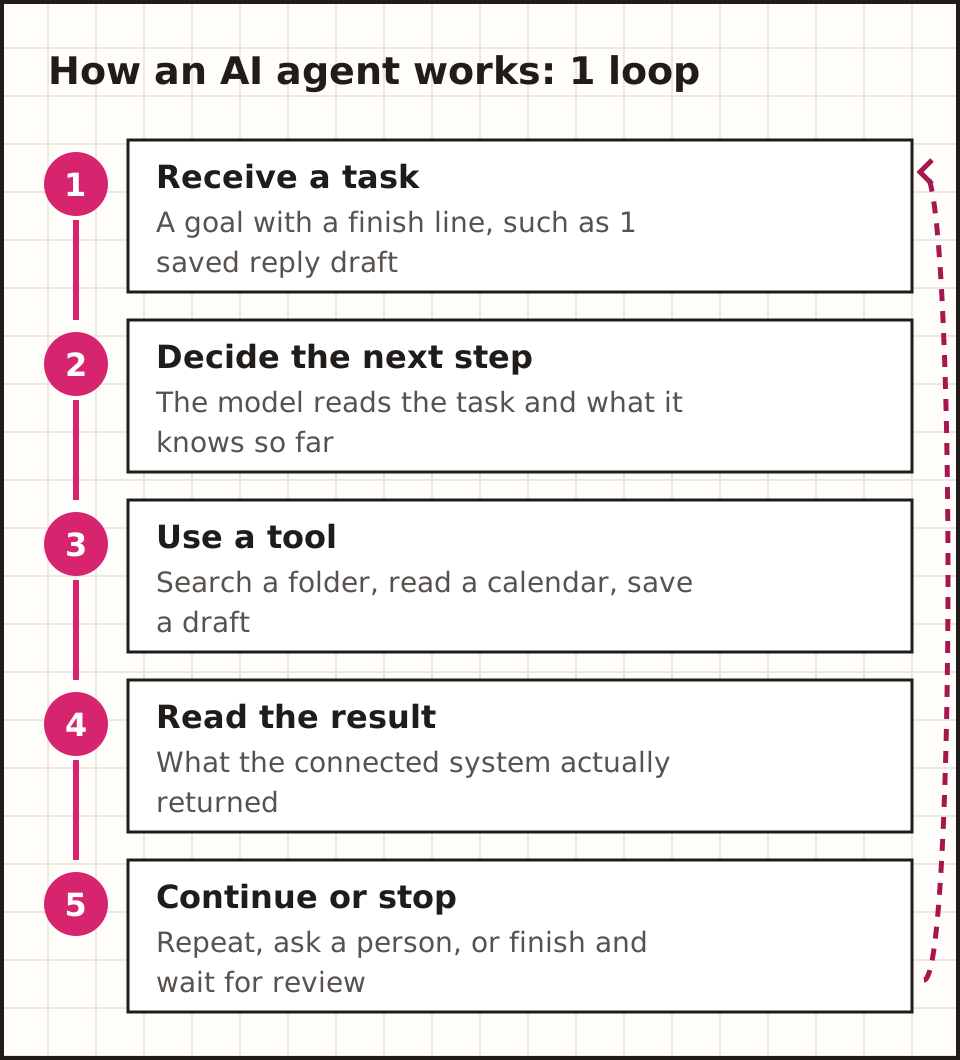
Think of an agent as a loop with 5 steps. The model supplies the reasoning; connected software supplies access to email, files or a calendar.
Say an email asks to move a meeting. The agent finds the booking, checks 3 free times and drafts a reply. If the calendar holds 2 people with the same name, it should ask. If its access allows drafts only, a person confirms the change.
That is an illustrative workflow, not a tested product. It also shows the finish line every agent needs: "draft one reply with 3 free times, then wait" ends in one saved draft you can see.
How do agents, chatbots and workflows differ?
One product can mix all 3 of these, so a chat window alone tells you little about what the software can do.
When does an agent beat a fixed workflow?
Say an enquiry holds a postcode. A fixed workflow can look it up and send it to the right team. When the route is clear, that is the simple answer. Adding a model only adds one more decision to check.
Now say the enquiry has a long story, 4 attachments and an unclear request. A model can help read it. You can still keep it inside a fixed workflow: sort it, summarise it and pass it to a person.
An agent earns its place when the next step depends on what it finds. It might open a policy, see that it points to a schedule, read that schedule, then ask for a missing detail. That freedom also means more paths to test.
Anthropic's guide to workflows and agents splits fixed steps from model-directed action. Treat that as a design idea, not a rule every vendor's labels follow.
What parts make up an office agent?
An office agent has 5 main parts: a model, instructions, tools, information and controls. Some also keep memory.
Example: an accountant's inbox agent (illustrative workflow)
Trigger: a client's email lands in the practice inbox with a PDF bank statement attached.
What does the model do?
A large language model is software trained on patterns in text. Inside an agent, it reads a request, plans, picks a tool and drafts a reply. The app around it decides which of those actions actually run.
Say the model asks for a calendar lookup. The app checks that the lookup is allowed and returns the result. A smooth answer and a real lookup are 2 different pieces of proof. Check what the model said apart from what the system confirmed.
What are tools?
Tools are the actions the app lets the model take. A tool might search a folder, open a customer record or save an email draft. Each tool takes an input, such as a booking ID, and returns a result, such as 3 free times.
A narrow tool is easier to control. "Create a draft in the enquiries inbox" has a clear limit. Full access to a computer opens far more actions. Match access to the one job you want done.
What information can it use?
An agent can read the current message, chosen files and what its tools return. That working information is called context. Old context gives old answers, even when the agent follows its rules.
Put a date beside each key rule. If 2 files disagree, give the agent a route to a reviewer. "These 2 files conflict" is a more useful result than a confident reply that hides the clash.
What is memory?
Memory is information kept for later. It might be a list of finished steps, a chat summary or a saved preference. Many agents work inside one session only; lasting memory is a design choice.
Decide who can read, fix and delete what it keeps. A note that says "client prefers Tuesday" can go stale. A date and a source help a reviewer decide whether to trust it.
What do guardrails do?
Guardrails are limits on what the agent can do. Examples: only 2 folders it can read, approval before any send, and a stop after 10 steps. Instructions explain the rules; enforced permissions decide what the software can really do.
For a first trial, split making work from releasing it. Let the agent create a draft. Name one person who checks it. Early mistakes then stay inside the office.

What would an agent do with an office enquiry?
Picture a fictional practice that gets this email: "Can we move Friday's meeting to next week? I've also attached the file you asked for." There are 2 jobs in one email: a booking and a file.
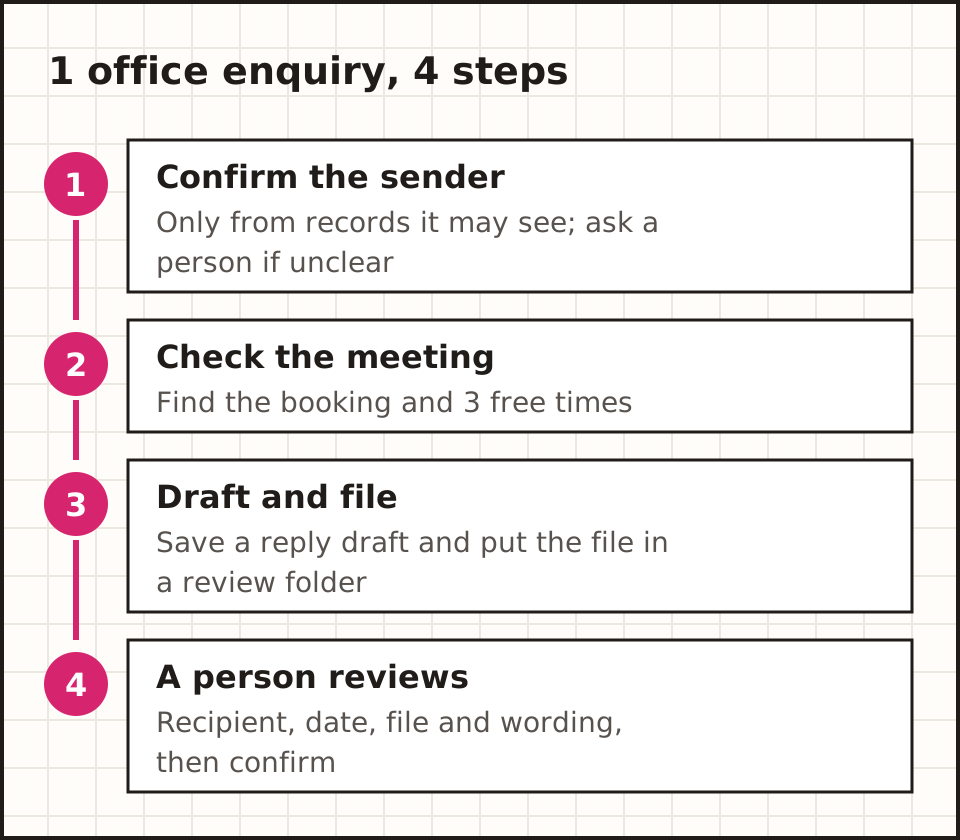
If a forwarded email leaves the sender unclear, the agent asks a person instead of guessing the client. The draft names the meeting and links to the original email, so the reviewer can check it in one click.
To judge the trial, ask 4 questions. Did it pick the right client? Did it keep the file intact? Were the times really free? Did it stop when the sender was unclear? Those answers matter more than how natural it sounded.
What does a good test case look like?
A good test case has 3 parts written before the run: the input, the expected output and the reason. For example: a fictional email asking to move a meeting to a day the office is closed. Expected output: a draft that offers 2 open days instead. Reason: it checks that the agent reads the opening hours.
Write one case for each of the 5 kinds in the trial diagram. Keep them in a shared document, never only inside the tool, so you can re-run them after any change to the instructions, the model or the connected systems.
When a real job goes wrong, turn it into a new fictional test case.
Which tasks should wait until later?
Leave out any task where a wrong answer is costly and hard to spot. Advice on tax, law or health falls here, as do payments, refunds and anything that commits the business to a price.
Also wait on tasks with no clear owner. If 3 people each assume another will check the draft, nobody does. Give each task one named owner before it goes near an agent.
Finally, skip tasks that happen once a month. You will not see enough runs to judge the result, and the setup time will rarely pay back. A task that comes up 10 times a week gives you real evidence within 2 weeks.
A useful test: could a new staff member check the agent's output in under 5 minutes with the documents you already have? If the answer is no, the task needs a clearer source or a narrower output before any software is involved. Some failures are plain, like a tool error; others look fine until someone checks the record.
Which office tasks are good starting points?
Start with work that has a clear input, an output you can check and a small cost if it goes wrong.
| Task | A useful first output | What a person checks |
|---|---|---|
| 1. Incoming enquiries | A category, short summary and draft reply | The real request, the recipient and any promise |
| 2. Meeting preparation | A brief linked to the notes | Dates, decisions and gaps |
| 3. Document collection | A list of files received and still needed | The client, the period and the original files |
| 4. Internal questions | An answer linked to 1 approved policy | Whether that policy is current |
| 5. Follow-up admin | A reminder based on an agreed task | Whether the task is still open |
Pick a task with an owner who can spot a bad result. And if a form or a plain automation already does the job, test that too: the goal is useful work at a fair cost, not AI in every step.
What happens next
Got a task in mind? The small business guide walks through one trial, from picking the task to measuring the review time.
Plan a first trialWhat can go wrong?
How do you catch wrong answers?
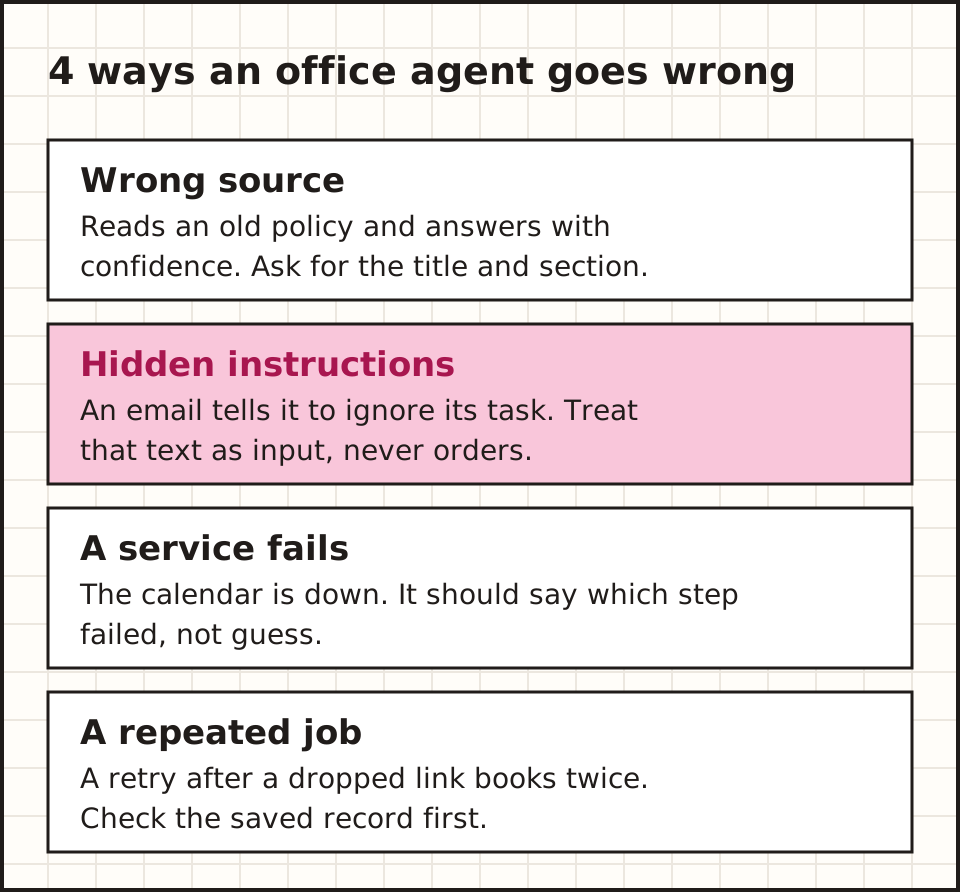
Ask for proof with each answer. For a policy question, that means the policy title and section. For a booking, it means the real calendar entry. A link that opens is only the start: a reviewer still checks that the source backs the claim.
Use test cases with known answers. Include one old file, one unclear name and one missing attachment. Write the expected result before each run, so a polished reply cannot quietly change what counts as success.
What is prompt injection?
Prompt injection is text that tries to make an AI follow orders hidden in what it reads. An email or web page might tell the agent to drop its task or reveal data. That text is input to check, never an order that changes its access.
In a trial, put one obvious hostile line in a fictional email. Check that the agent stays inside its task. A warning in the prompt is one layer; tight tools and a person approving key actions add 2 more.
What happens when a connected service fails?
Decide what the agent does when email, a calendar or a file system is down. A good failure names the step that failed and keeps finished work safe. It should tell "no matching record" apart from "the lookup did not run".
Also test a repeat. If an agent saves a booking and then drops its connection, a full retry can make a duplicate. A task reference and a check of the saved record stop that.
What can Australian offices check about privacy?
Map where the data goes before you connect a live inbox. one task can touch 4 services: the email provider, the agent platform, the model provider and a logging tool. Ask what each one receives, where it is stored, who can see it and how long it is kept.
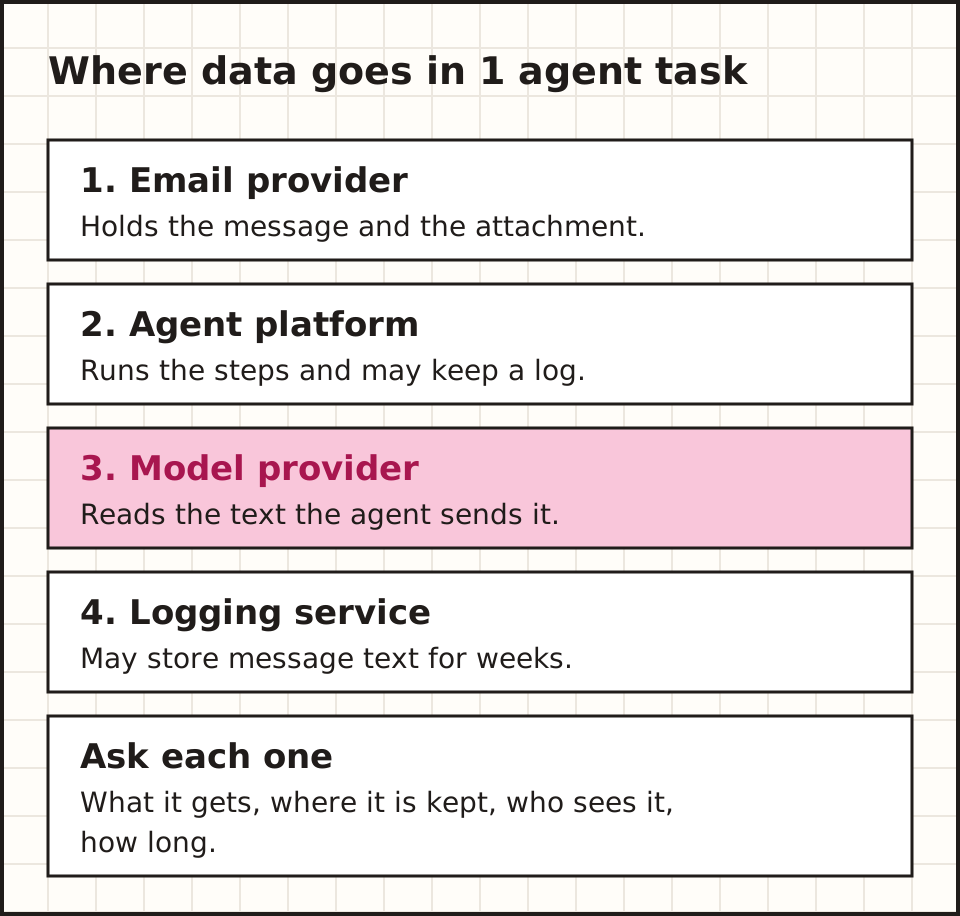
The OAIC's guidance on commercially available AI products says privacy duties can apply to personal information you put into AI and to personal information it produces. It recommends due diligence and openness. It also warns against putting personal, and above all sensitive, information into public generative AI tools.
Get qualified advice for your own case: the Privacy Act, contract confidentiality and professional duties are separate questions. Use fictional data for the first trial, and review vendor terms before any live data goes in.
What did our editing regression test reveal?
We ran a controlled check of an editing workflow on 16 October 2026. In an isolated copy of a 20-page website, we left an old section address in 20 links and an old guide address in 2 homepage links. The pages still loaded, but those 22 links went nowhere.
The article SEO check passed all 17 articles in that copy. A separate link check then found the 22 broken links. The 2 checks measured different things: page structure on one side, real link targets on the other.
| Controlled check | Observed result |
|---|---|
| Article SEO checks | 17 articles passed |
| Outdated section links | 20 broken references found |
| Old homepage guide links | 2 broken references found |
| Scope | An isolated test copy; no client outcome measured |
This is a real test, unlike the fictional office examples above. Its lesson is narrow: a passed check proves only what that check looked at. An agent's edit still needs its own target and click checks before the task is accepted.
What does an AI agent cost to run?
There are 5 possible costs: the subscription, model usage, connected services, hosting and review time. Products charge per token, per run or per minute, so compare the whole job, not one advertised rate.
Keep a simple sheet of fixed costs, usage charges, jobs done and reviewer time. A low price per attempt can hide costly rework.
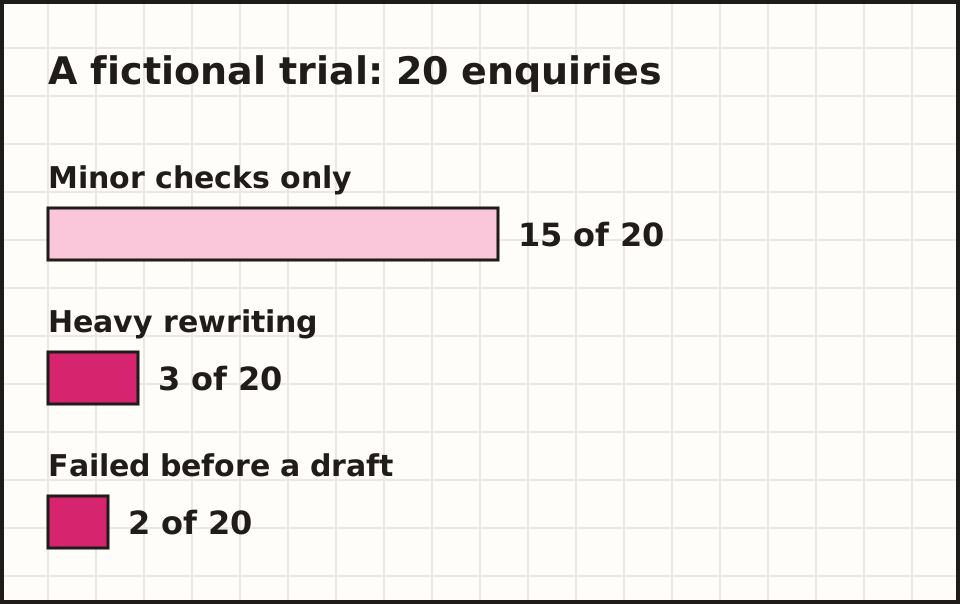
In that fictional trial, calling all 20 a success would hide 5 jobs that cost real review time. Set a cap on steps, retries and paid actions, and name one person who gets the stop alert.
What goes on a simple cost sheet?
Use one row per job and 6 columns: the date, the task reference, the result (accepted, fixed or failed), the minutes a person spent checking it, the usage charge if the tool shows one, and a short note on what went wrong.
At the end of each week, add up 3 numbers: accepted jobs, total review minutes and total charges. Divide the charges and the minutes by the accepted jobs. That gives you a cost per useful result you can compare with doing the job by hand.
Keep failed jobs on the sheet. They cost time even when they produce nothing, and a rising failure count is often the first sign that a connected system or a source document has changed. Check the sheet every Friday for the first 4 weeks, then monthly once the numbers settle. Share the totals with whoever approved the trial, so the decision to continue rests on the same numbers.
Over a few months, your test cases and this sheet become the best record of what the agent can and cannot do.
What can you ask an agent supplier?
Ask the supplier to run your task with fictional data. Watch one normal run and one failed run. Ask to see the activity log, the approval step and where an admin removes access.
Ask for the data path and the charges in writing. Do logs keep message text? Does the model provider get attachments? Can admins set a usage cap? Keep the answers beside the contract.
Ask who owns it after the demo. Someone must handle changed systems, expired access, new policies and error reports. A working demo is useful proof, but running it every week is part of the buying decision.
How do you trial an agent before relying on it?
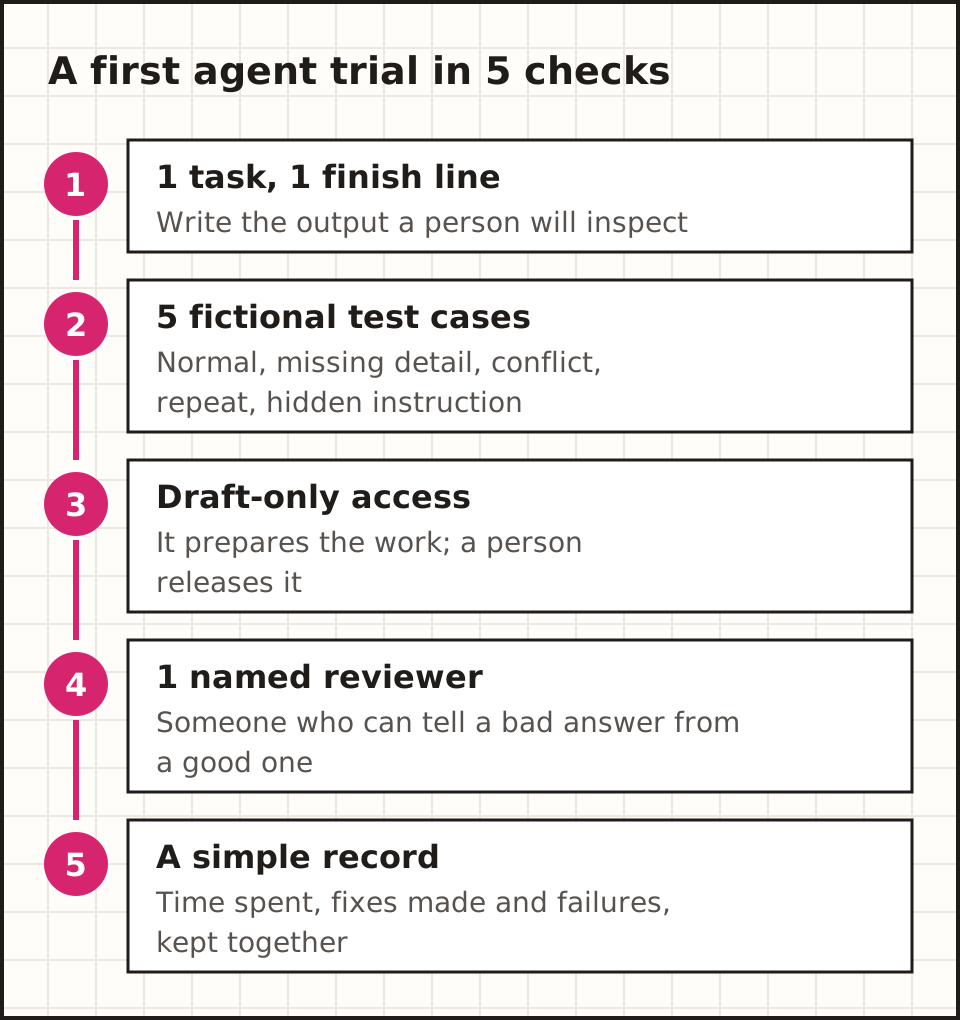
Step 1: write the expected output in plain words, and list the actions that need a person, such as sending. Step 2: reuse the same 5 test cases for every tool you compare.
Step 3: run it with draft-only access and check the draft where it lands. Step 4: test the stops: remove one folder, disconnect one tool, ask for something outside the task. A good system says what broke instead of guessing.
Step 5: compare it with your current process, counting setup and review time. A reliable drafting trial proves drafting; sending needs its own checks.
Common questions about AI agents
Is every AI chatbot an agent?
No. A chat window can sit in front of an agent, a fixed workflow or a model that only writes text. Check which tools the app can use and whether it picks actions during the task.
Can an agent approve its own work?
Software can run useful checks, such as reopening a saved record. For a decision that matters, an authorised person judges the result: another AI answer is not a person taking responsibility.
What happens next
Ready to try 1? The builders guide compares tools by the task, the connections and the approval step.
Compare agent buildersWhichever tool you choose, write the finish line first: a saved draft any staff member can check in under 2 minutes.
General information. Product documentation and guidance checked 15 October 2026. Examples described as illustrative are fictional teaching examples.