AI by profession
AI for small business: 5 jobs to hand over first, and how to test them
Start with one weekly job you can check, such as enquiry replies or meeting notes, and measure the whole job before you pay for more.
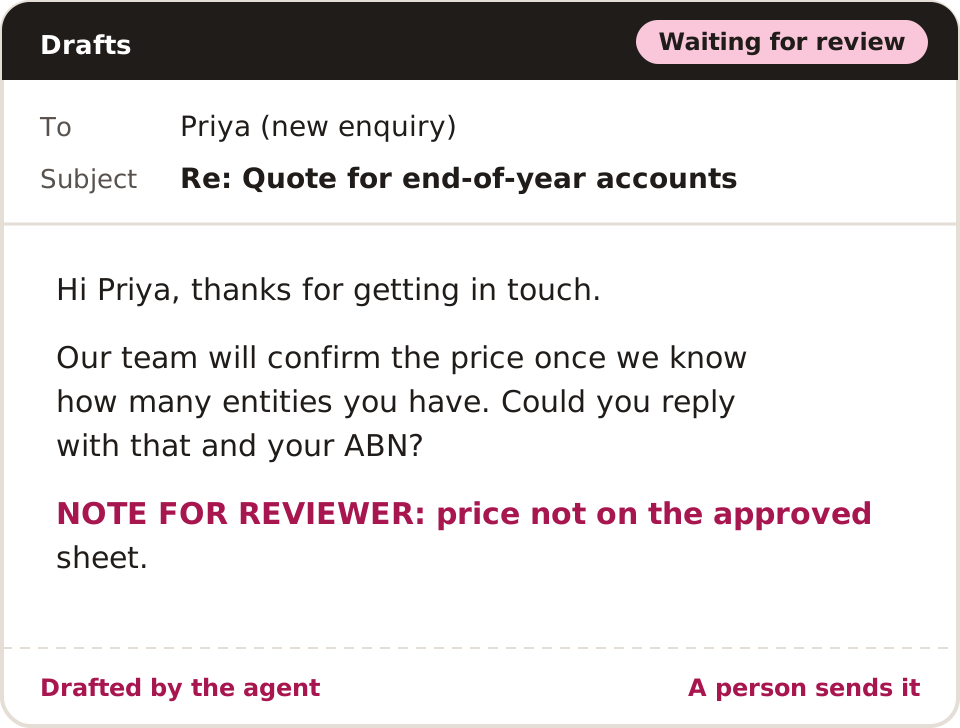
Start using AI in a small business with one repeated task you can check easily. Draft a reply, tidy a meeting note or build a document checklist from approved information. Name one person who reviews it, test 5 made-up examples first and compare the whole effort with how you work now.
Which small-business task can come first?
Pick work that happens at least weekly and has an output you can check. The owner should know what "correct" looks like and have the source facts to check it.
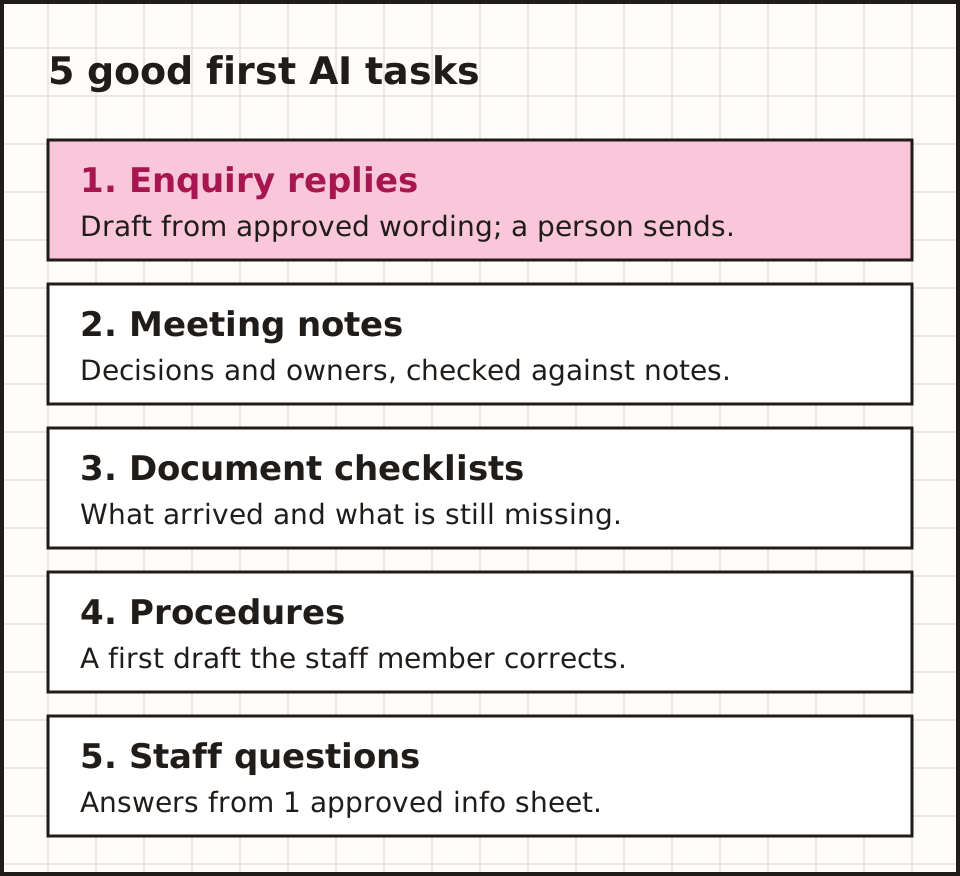
| First task | Keep it small with | Check it against |
|---|---|---|
| 1. Draft enquiry replies | 1 enquiry type and approved wording | The original message |
| 2. Prepare meeting notes | 1 fictional meeting record | Decisions and named owners |
| 3. Collect documents | 1 checklist and a test folder | The real files and dates |
| 4. Draft a procedure | 1 existing process | The staff member who does it |
| 5. Answer staff questions | 1 approved info sheet | The current source |
Start with enquiry replies: prices and promises still get today's sign-off.
What does a good enquiry draft look like?
A good draft does 4 things. It thanks the sender by name, answers the question using only your approved wording, lists anything it could not answer, and ends with the next step a person will take.
It should not invent a price, a date or a promise. If the enquiry asks for a quote and your approved sheet has no price, the draft says a team member will confirm it and flags the gap for the reviewer.
Keep 3 example drafts your team agrees are right. They become the standard every new draft is checked against, and the examples you give the tool in its instructions.
Do you need a chatbot or an agent?
Use a writing assistant when the job is turning your notes into text. Use plain automation when the steps never change. An agent matters only when the software must pick and use connected tools during the task.
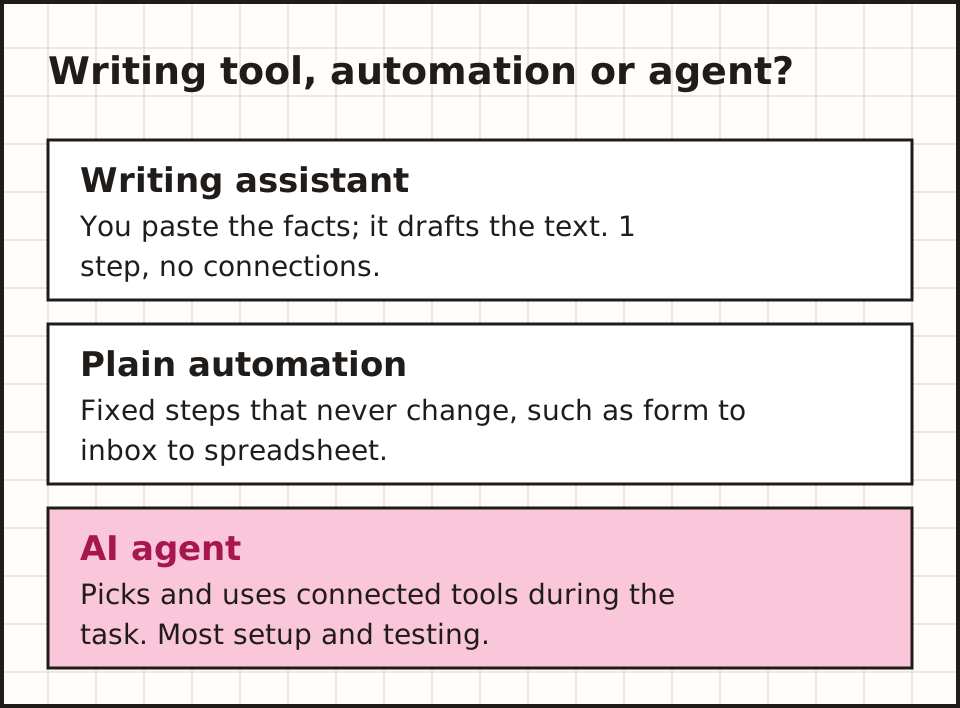
Pasting fictional notes into an approved writing tool gives a draft summary in one step. Having software fetch those notes, check a folder and save the result adds setup work. Decide if that extra work solves a real problem. The AI-agent introduction explains what changes when tools are added.
When is plain automation enough?
If the same input always leads to the same step, plain automation is usually cheaper and more reliable. A web form that sends a copy to your inbox and adds a row to a spreadsheet needs no AI at all.
AI helps when the input is messy: free-text emails, long notes or documents in different layouts. Even then, you can keep the AI to one step, such as sorting or summarising, inside a fixed workflow.
A simple rule: if you can write the steps as a checklist with no judgement calls, automate the checklist. Bring in AI only for the step where a person currently has to read and decide.
What do you prepare before opening an account?
Write a 1-page task sheet with 5 lines: the input, the approved source, the output, the reviewer and when to stop. Add 5 fictional examples with answers you have checked yourself.
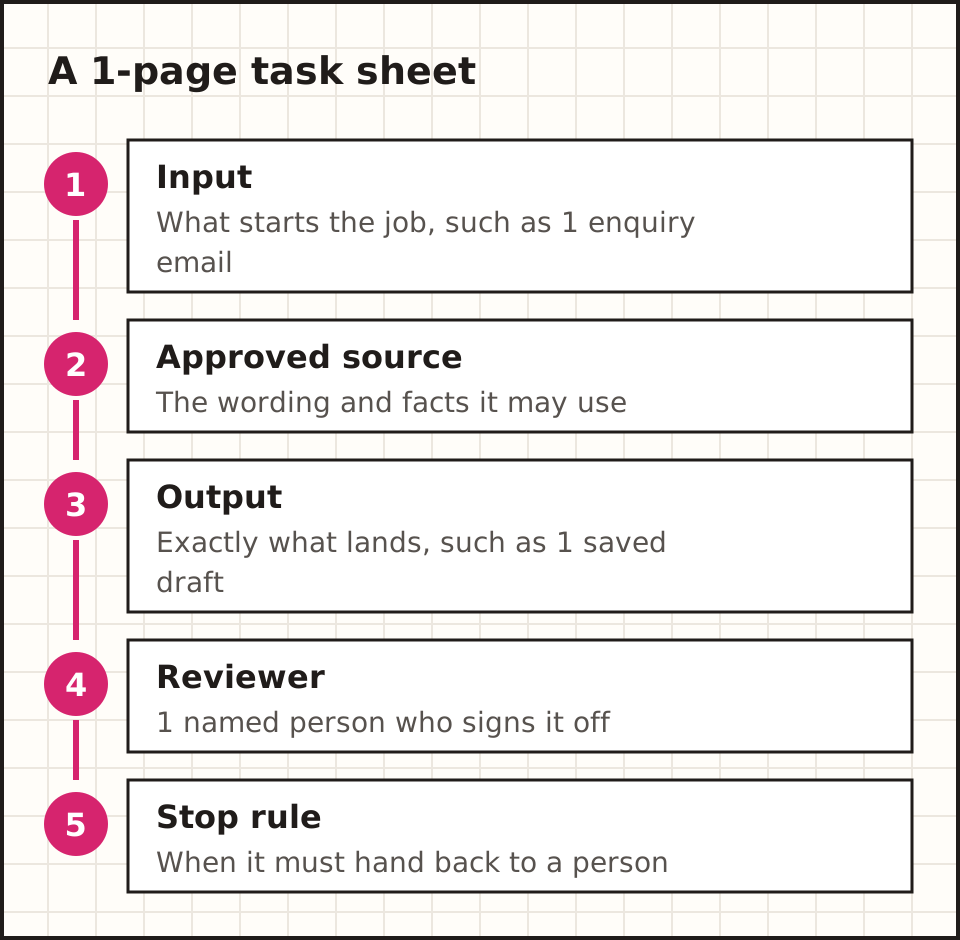
For an enquiry trial, gather your office wording and the public facts a draft may use. If your hours change on public holidays, say where that rule lives. A tool cannot fix an unclear business policy by writing more text.
Save the trial output in a draft folder the reviewer can find, apart from real customer records. Then list what data the tool would receive, so you can check the product terms against a real proposal.
How do you write the stop rule?
The stop rule says when the tool must hand the job back to a person. Write it as a short list of triggers: a missing price, a complaint, a request to cancel, an unknown sender, or anything about money owed.
For each trigger, say what happens next. Usually that is a short note in the draft and a flag the reviewer can see in their normal inbox or task list.
Test every trigger with one fictional example before the trial starts. A stop rule that has never fired in testing may not fire when it matters.

How do you choose software without a long shortlist?
Compare 2 or 3 options on the same fictional task. Include one missing detail and one out-of-scope request in each demo. Start with tools already inside systems you use, but check the exact feature and plan.
Judge how the reviewer works, not just the first answer. Can you open the source, fix the result and save it? Can the owner find a failed task and remove the tool's access? business.gov.au's AI guidance is a useful Australian starting point.
What should a demo show you?
Ask each supplier to run your 5 fictional examples live, in a test account. Watch for 3 things: whether the output matches your expected answer, whether it stops on the missing-detail case, and how many clicks the reviewer needs to fix and save it.
Ask to see where the activity log lives and how an owner switches the tool off. If the supplier cannot show both in the demo, assume your team will struggle to find them later.
Write your score down during the demo. A side-by-side sheet of 2 or 3 options, each scored on the same 5 examples, makes the choice far easier than memories of a smooth presentation.
What happens next
Weighing up tools? The builders guide compares 3 kinds by task, connections and approval steps.
Compare the buildersWhat should the first instructions say?
State the job and the finish line in plain words. For a fictional enquiry: "Draft a reply using the approved office wording. List missing details separately. Leave the draft for review."
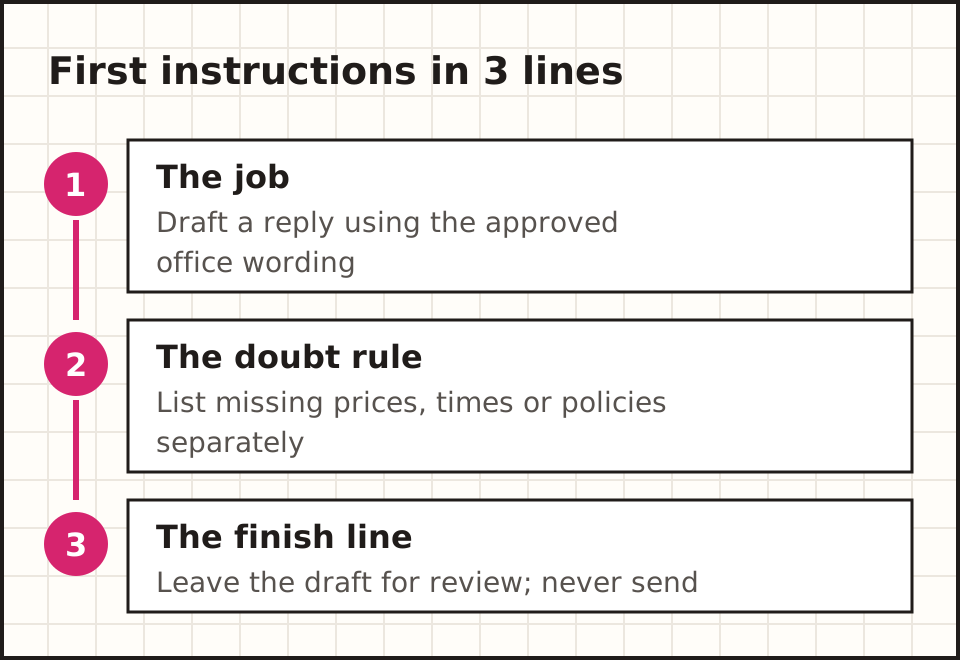
Say how to handle doubt. If a price, time or policy is missing, the tool should flag it. A useful draft with 2 visible questions beats a complete-looking answer built on guesses. Add one good example and say why it works.
What does a good example look like?
A good example shows a real-looking enquiry, the draft you want, and one line on why it is right. Keep it close to the actual task: an example about a different service teaches the wrong habits.
Use 2 or 3 examples, not 20. Long instructions full of unrelated rules are harder for the tool to follow and harder for a staff member to check.
When the tool gets something wrong, fix the example or the source first, not just the prompt. Most bad drafts trace back to a missing fact rather than a badly worded instruction.
What do you check before using real information?
Name the data, the providers that receive it and the rules that apply. Check access, retention, training use and deletion for your exact plan. The OAIC's guidance on commercial AI products is the privacy reference to start from; get advice for your own case.
Keep the first trial on fictional data. It tests prompts, fixes and failure routes before any live-data decision.
How do you measure whether it saves time?
Time the whole job, from input to accepted output. Count preparing the facts, prompting, checking sources and fixing the draft. Compare it with today's process on the same idea of "finished".
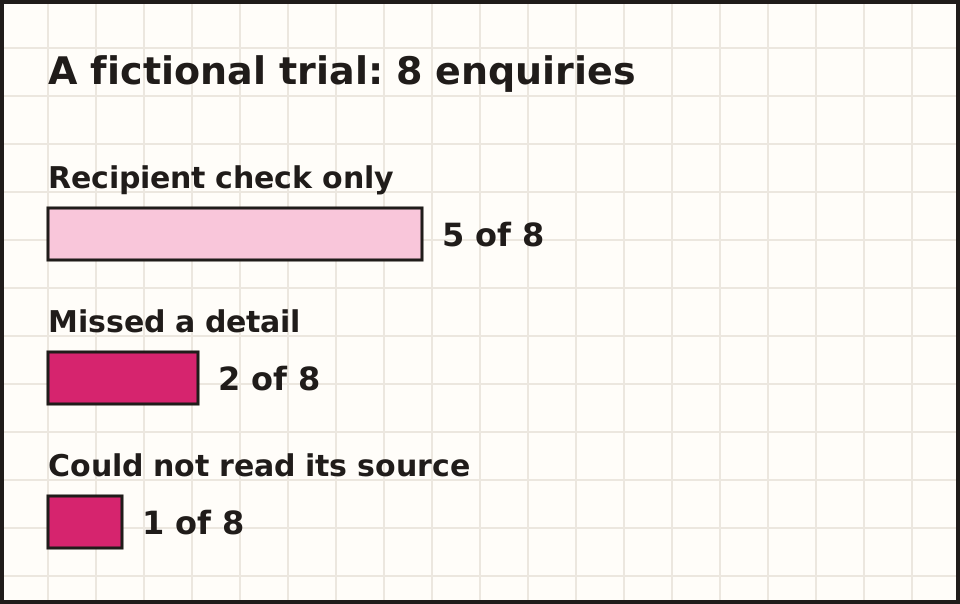
Say a fictional trial handles 8 enquiries. 5 need only a recipient check, 2 miss a detail and one cannot read its source. Counting 8 answers as 8 finished jobs would hide the work the owner still did. Keep setup time on its own line.
Running costs work the same way. List fixed fees and usage charges, then work out the cost per useful, reviewed result. Set a spending cap and name one person who gets the alert.
What goes on the review sheet?
Use one row per job with 5 columns: the job reference, the result (accepted, fixed or failed), the minutes spent checking it, what was wrong, and any charge the tool showed.
Each Friday, total the accepted jobs and the review minutes. Compare the minutes per accepted job with how long the task took by hand. That number, not the tool's speed, shows whether it saves time.
Keep the failed rows. A run of failures after a quiet week usually means a source document or a connected account has changed.
What happens when the owner is busy?
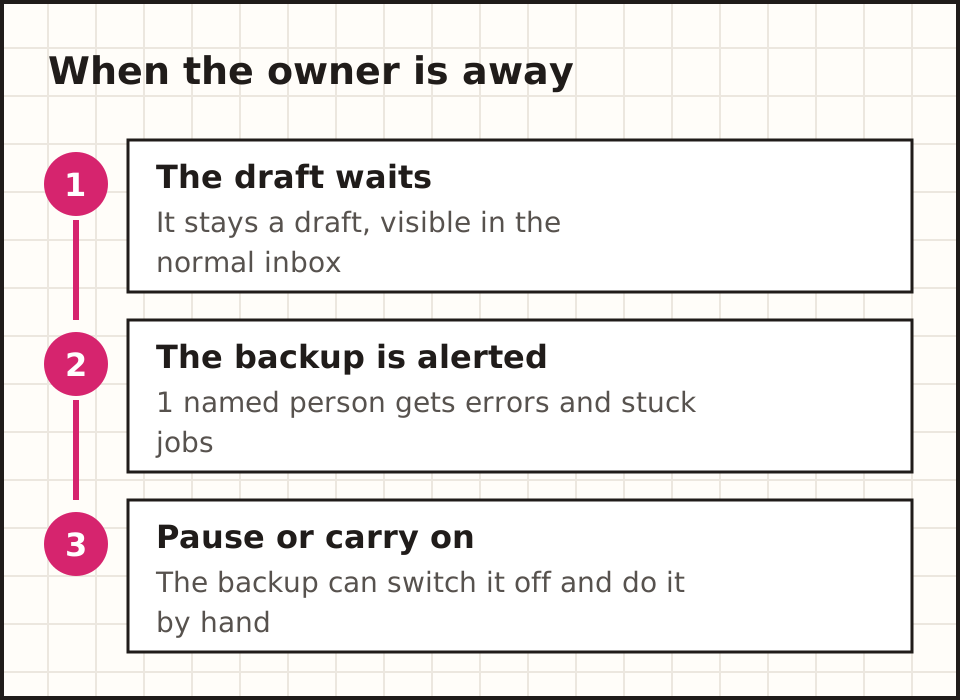
A draft waiting for review should stay a draft, visible to its owner. Name a backup who gets errors when the owner is away and can pause the workflow. Test it: break one test connection and check the alert reaches that person.
Brief staff with one worked example and one error example. Ask the person who does the task now to review the first results. Give them a phrase such as "needs owner review" that leads to a real person.
How do you keep it manageable when one person owns several jobs?
Keep the drafts, sources and review sheet in the place the owner already works, not a new app they must remember to open. The trial should cut confusion, not add another inbox.
Write a short operating note for a second staff member: what starts the work, where the result appears and what stays a human decision. Walk through one fictional failure using that note.
If the tool is down, staff should still be able to do the task the normal way. Keep your approved wording outside the tool so nothing depends on one chat history.
How do you decide the next step?
Choose one concrete change from the trial: fix the wording, add a missing source or test a second enquiry type. Keep sending, booking or changing records as separate steps, each with its own test.
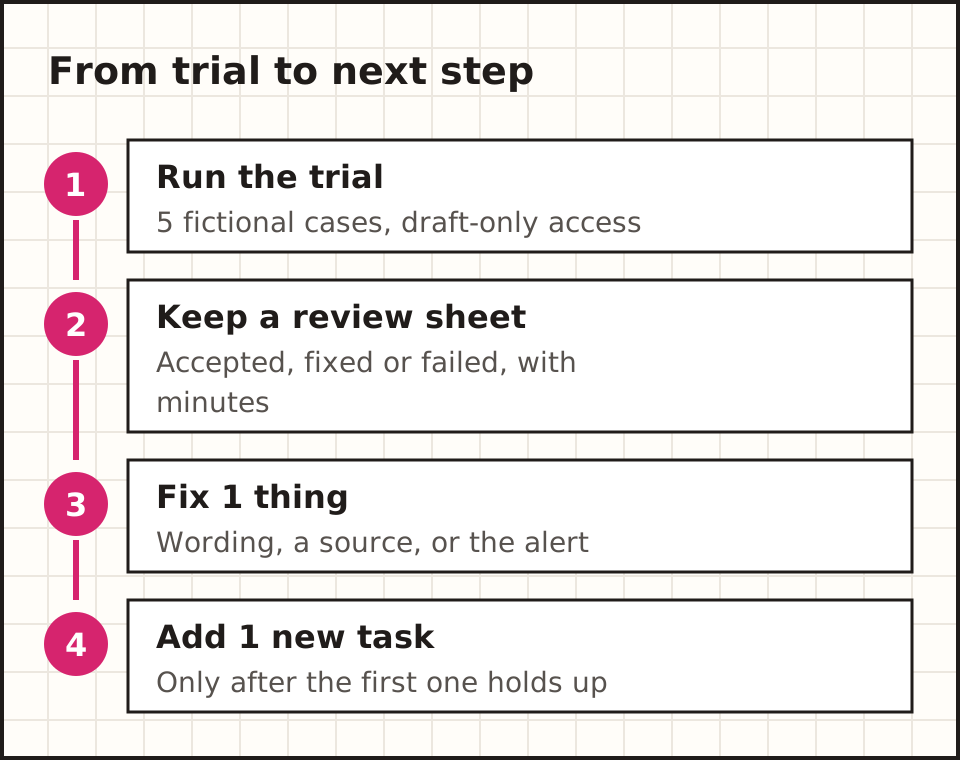
Save the task sheet, source and review results with your other procedures. A second staff member should understand the setup without reading old chats.
What goes in a small-business AI policy?
List which tools are approved, what each may do and what data each may receive. Name the reviewer and the person who owns changes. Say how to report a problem and switch back to the normal process.
Use examples staff recognise. "Draft a public-info reply from this approved sheet" is a clear rule. "Use AI to be productive" leaves every staff member to make up their own rules.
Give key source documents an owner and a date. Re-run the test cases whenever the policy or the software changes, and keep the result with the version you tested.
Common questions about AI for small business
What is the easiest place to start?
A draft built from approved information. Pick a weekly task and a staff member who can spot errors, then test 5 fictional examples.
Do we need an AI agent straight away?
Usually not. A writing assistant or plain automation may cover the first task. Add an agent when it solves a problem you can test.
Can we use it for phone enquiries?
A phone workflow adds speech, message delivery and handover questions. The AI receptionist guide has a call-based trial checklist.
What happens next
Want the full picture first? The basics guide explains the 5 parts of an agent in plain English.
Learn the basicsWhichever task you pick, write its finish line on the task sheet before you start.
General information. Product documentation and guidance checked 15 October 2026. Examples described as illustrative are fictional teaching examples.